

How to Optimise a Service or Product Page for SEO
If you’ve ever wondered why your competitors appear above you in the Google search results, the answer is usually to do with Search Engine Optimisation (SEO).
Many small business owners spend time and money in creating a website but struggle to generate enquiries or sales because their service or product pages aren’t properly optimised for search engines.
You don’t need to be an SEO expert to improve your website and ensure it appears in the search engine results. Making a few changes can help Google to understand your pages better and increase traffic to your website.
In this blog, we’ll explain how to optimise your product or service pages for SEO in a way that’s easy to understand and implement.
Why does SEO matter for your service and product pages?
Service and product pages usually generate leads and sales for your business.
Blog posts are great for attracting bottom of the funnel traffic, but product and service pages are where potential customers decide whether to contact you or make a purchase. A well optimised page can help you appear in search results for keywords related specifically to your products and services and help you drive more sales.
Unlike paid advertising, SEO will continue to generate traffic long after the work has been completed.
Step 1: Choose the right keyword
Before you start editing your website pages, you need to think about what your customers are searching for.
For example:
A gardener might target:
Garden maintenance bakewell
Garden landscaping bakewell
An accountant might target:
Small business accountant Sheffield
A plumber might target:
Emergency plumber Sheffield
Boiler repair Sheffield
For complete clarify for both Google and your website visitors, stick to one primary keyword for each page.If you try and target too many keywords, Google will be confused and your product page is unlikely to appear in relevant searches.
Try to create dedicated pages for specific products or services wherever possible.
Step 2: Optimise the page title
The page title is one of the most important SEO elements.
It’s usually the blue link people see in the search results.
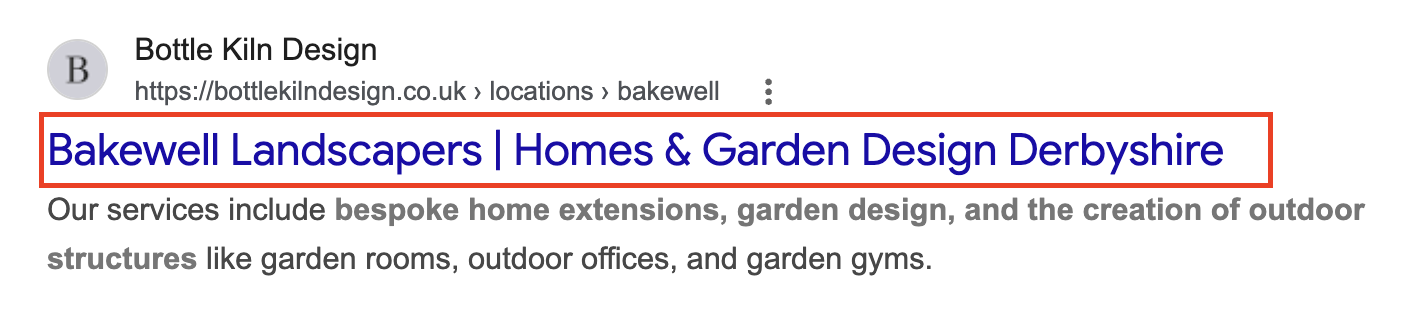
A good title should include the main keyword for your page, describe your page and encourage people to click through from the search results.
Step 3: Write an engaging meta description
The meta description appears underneath the page title in the search results.
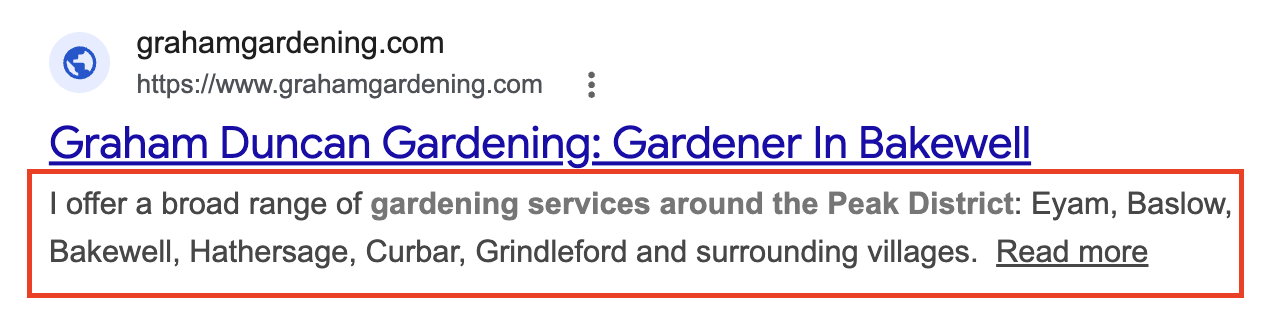
The meta description doesn’t have a direct impact on your rankings in the search engine but it can help with click through rates.
Make sure your meta description includes the keyword for your page naturally, clearly explains the page and encourages users to take action.
Step 4: Use clear headings
Google uses the headings on your page to understand the structure of your page.
Always include the following headings:
Heading 1:This is the main page heading and should always include the keyword for your page and there should only be one of these on the page.
Heading 2:These help to break the content on the page down into logical sections which could include a ‘Why Choose Us?’, ‘Pricing Information’ or ‘Frequently Asked Questions’ section.
Heading 3:Use these for anything under a heading 2 to show hierarchy on the page.
Step 5: Write helpful content
A huge mistake many businesses make when it comes to SEO is having very little information on service or product pages. Google ranks pages that provide useful information to the people who visit them.
Think carefully about the questions your potential customers are likely to have, the problems or concerns that have and the information that could push them towards making a decision.
For service pages include:
A service overview
Benefits
Your process
Pricing guidance
FAQs
For product pages include:
Features
Benefits
Price
Care instructions
Delivery information
Frequently asked questions
You should answer as many customer questions as possible and remove as many barriers to purchase as possible by providing potential customers with all the information they need to make a purchase.
Step 6: Optimise your images
Images not only help to improve user experience, but it can contribute to SEO too.
Before you upload any images to your website make sure you optimise the file name with keywords related to your business and the page you’re uploading them too.
You’ll also need to add alt text which describes the image to search engines and screen readers. This provides additional context and accessibility benefits.
Step 7: Add internal links
Internal links help Google find other pages on your website and keeps users on your website for longer.
For example, a service page might link to relevant blogs, related services, case studies or your contact page (or all of these!)
A product page might link to other related products, buying guides, delivering information and customer reviews.
Internal linking is an easy way to boost the rankings of your website but it’s often overlooked by many businesses.
Step 8: Include trust signals
When considering which websites to rank at the top of the results, Google looks for credible businesses that demonstrate expertise in their sector.
Adding trust signals to your website such as the following can help to improve rankings and conversion rates:
Customer reviews
Testimonials
Certifications
Awards
Case studies
Years of experience
Industry memberships
Step 9: Make it easy for visitors to take action
Driving visitors to your website is a great first step. But you need them to take action when they get there. Make sure every product or service page has a clear call to action.
Buttons include:
Request a quote
Book a consultation
Contact us
Buy now
Add to basket
Having a button encourages visitors to take the next step towards a purchase and makes it easier for them to do so which can improve conversion rates.
Step 10: Check mobile performance
The majority of website traffic now comes from mobile devices. This means your website needs to be mobile friendly to drive as many enquiries and sales as possible.
Check how quickly your site loads, whether the text is easy to read and the buttons are easy to use.
A slow or hard to use mobile experience can have a negative impact on your rankings and conversions.
Quick SEO checklist for your product or service pages
Before you publish or finish a product or service page, check the following:
Main keyword included in the meta title
Main keyword included in the H1
Meta description is included
Helpful content is included
Images are optimised
Internal links are added
Trust signals are included
A clear call to action is included
Design is mobile friendly
Don’t have time to optimise your website?
Most small business owners know their website needs to be optimised but don’t have the time to learn SEO or implement improvements regularly.
This is where Rent a Marketer can help.
We can provide an SEO audit to help you find out exactly how your website is currently performing and the changes you need to make.
Or we can optimise your product or service pages for you to save you time and help to improve your website’s performance.
Get in touch today to find out how we can help your website work harder for your business.